
Table of Contents
-
1. Overview
2. Getting Started
3. Discord Commands
3.1 @Bot Quick Intel
3.2 Mention Keyword Menu
3.3 Chalk List Command
3.4 /bet Command
3.5 /pick Command
3.6 /setup Command
3.7 /props Command
3.8 /steam Command
3.9 /parlay Command
3.10 /parlay_cancel
3.11 /parlayboard
3.12 /team-stats
4. Discord Features
4.1 Morning & Evening Recap
4.2 Monthly Champ
5. Betting Page
6. Tracking Page
6.1 Steam Moves
6.2 Player Props
6.2.1 Track, endorse & untrack
6.2.2 Moderators
6.2.3 /prop-pick
6.4 Parlays
NEW
6.4.1 Builder & Bet page
6.4.2 Live tracker
6.4.3 Scoring
6.3 Server Arena
6.3.1 How admins opt in
6.3.2 Arena page & dashboard
6.3.3 /arena command
6.5 Tournaments
NEW
6.5.1 Admins
6.5.2 Players
7. Chalk List (Banned Player Tracker)
8. Sharp Alerts & Following
8.1 How Sharps Are Calculated
8.2 How to Follow Sharps
9. Web Dashboard
9.1 Stats Hub
9.2 Props Lab
9.3 Account Alerts & Profile
9.4 Team Stats
10. Premium Features
10.1 Server Premium Trial
10.2 Units & Stats Workbook
10.3 Pick of the Day
11. Stats, Streaks & Calculations
11.1 Leaderboards
11.2 Buddha's Insight
11.3 Lifetime Badges
12. FAQ & Troubleshooting
13. Server Management (Admins)
Betting Buddha User Manual
Track games, props, and parlays across Discord and the web - including NFL, NBA, MLB, NHL, UFC, NCAAF, MLS, and Liga MX.
- Invite Betting Buddha to your Discord server
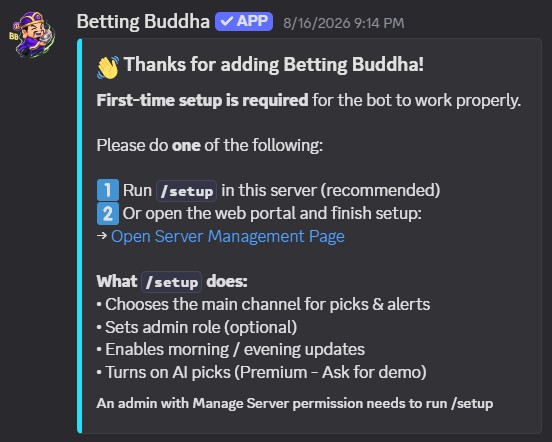
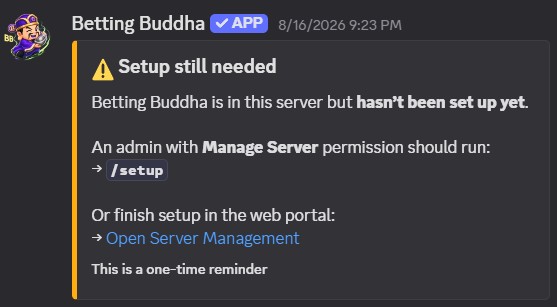
- REQUIRED: Run
/setupafter inviting the bot (or configure Manage on the web). - In Discord, run command: /bet and place your first pick, then login to the web interface and try there!
- Log in at botsbuddha.com using your Discord account
- Select your server from the dropdown in the top navigation
- Start placing picks - they appear instantly on the web dashboard
3.1 @Betting Buddha Quick Intel
Tag the bot in any channel it can read. It replies with an embed from that server's data (no extra Odds API cost). A bare mention with no extra words opens the help menu.
@Betting Buddha help@Betting Buddha Lakers · @Betting Buddha Jets spread@Betting Buddha how hot is @User@Betting Buddha who is on Chiefs@Betting Buddha split Jets · @Betting Buddha roast @User@Betting Buddha vibes · @Betting Buddha injury Rangers
@Betting Buddha is the reliable way everywhere.
3.2 Mention Keyword Menu
After you tag the bot, add one of these phrases. Keywords are matched in order
(heat/streak before team names, so hot never gets treated as a team).
People
hot streak heat sharp card stats record profile badgeTag a member. Heat report uses live settled picks (W-L last 5). Sharp / card / badges pull this-server stats.
Board
who is on leaderboard standings live pending yesterday arena split who faded tail injuryWho is on a team, last-7-day winners (wins first), open tickets, yesterday's record, Arena month board. Split and who faded show open sides. Tail shows who copied whom. Injury reads the 72 hour cache.
Markets
Jets spread ml steam chalk props parlayTeam intel + optional market. Steam / chalk snapshots. Props by player or team. Parlay board or parlay @User.
Sports & Extra
ufc soccer mls liga mx ncaaf potd units portalToday's cached slate for that sport. Pick of the Day. Units explainer. Portal links (Bet, Tracking, Stats Hub, Props Lab).
Fun
roast bless pray coin excuse vibesShort embeds only. Roast needs @User. Bless, coin, excuse, and vibes work with a bare tag. None of these place a ticket.
| Say this | What you get |
|---|---|
@Betting Buddha help |
Full keyword menu embed |
@Betting Buddha how hot is @Maya |
Heat report: current streak, last 5, all-time high |
@Betting Buddha is @Maya sharp |
Sharp card for that member in this server |
@Betting Buddha stats @Maya |
Compact record / profile card |
@Betting Buddha badges @Maya |
Recent lifetime badges. Omit the user for the server's latest awards |
@Betting Buddha who is on Jets |
Members in this server on that team right now |
@Betting Buddha leaderboard |
This server, last 7 days, ranked by wins then fewer losses |
@Betting Buddha live |
Open game tickets, props, and parlays |
@Betting Buddha yesterday |
This server's settled game record for yesterday (ET) |
@Betting Buddha arena |
Opt-in status, heat, and top servers this month |
@Betting Buddha Jets spread |
Team card focused on the spread market |
@Betting Buddha steam |
Recent steam / line moves from cache |
@Betting Buddha chalk |
This server's chalk list snapshot |
@Betting Buddha props Judge |
Today's tracked props matching that player or team |
@Betting Buddha parlay |
Server parlay counts. Add @User for their recent tickets |
@Betting Buddha ufc / soccer / ncaaf |
Games in today's cache for that sport (empty if no slate) |
@Betting Buddha potd |
Today's Pick of the Day if staff posted one |
@Betting Buddha units |
How default unit size works (locked after you submit) |
@Betting Buddha portal |
Links to Dashboard, Bet, Tracking, Stats Hub, Props Lab, Arena |
@Betting Buddha split / who faded Jets |
Open tickets in this server, grouped by side. Add a team name to narrow it. |
@Betting Buddha tail / tail @User |
Who copied them and who they copied in the last 14 days |
@Betting Buddha injury / injury Rangers |
Last 72 hours from the same injury cache as Tracking. Empty if nothing is stored. |
@Betting Buddha roast @User |
One rotating line from their recent form. Tag required. |
@Betting Buddha bless / pray |
A short house line before a slate. Does not pick a side. |
@Betting Buddha coin |
Buddha does not flip. Pick a side or sit. |
@Betting Buddha excuse / excuse @User |
Canned excuse tied to their last loss when one exists |
@Betting Buddha vibes |
Tickets today, games in the live window, current heaters in this server |
track Lakers -4.5, Heat ML...) is no longer wired.
Log tickets with /bet, /pick, /parlay, or the web Bet / Parlay / Props pages.
3.3 Chalk List Command
Use /chalk_list to manage your server’s banned player tracker.
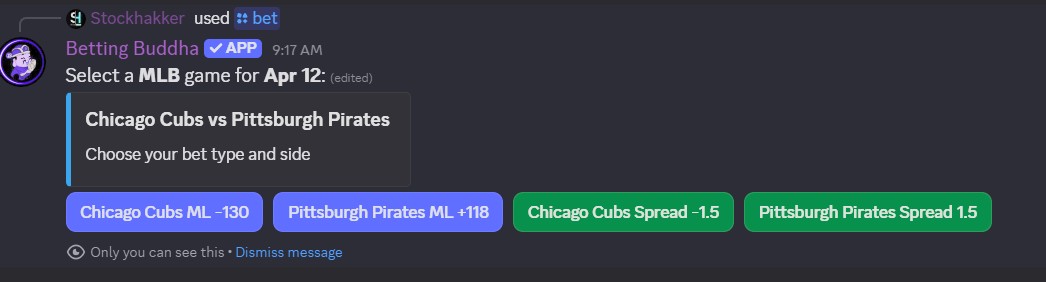
3.4 /bet Command
/bet and the bot will show a user-friendly dropdown menu with the latest lines pulled directly from the odds API.Simply select the team, bet type (ML, Spread, Over/Under), and line - no need to type everything manually.
3.5 /pick Command
Manual tracking when you need a custom line, an alternate total, or a team that is not on the live /bet slate.
Discord shows four separate fields - fill each one:
| Field | What to enter |
|---|---|
team |
One team in the game (e.g. Houston Texans or Texans) |
bet |
Type + optional line: ML, Spread -3.5, Over 38.5, u 38.5 |
odds |
American odds only (e.g. -110, +150) |
sport |
Optional. Use if the team is not on today’s cached slate (MLB / NFL / NBA / NHL / UFC / NCAAF / MLS / Liga MX) |
Houston Texans · bet: Under 38.5 · odds: -110team:
Texans · bet: u 38.5 · odds: -110team:
Texans · bet: Over 38.5 · odds: -105team:
Texans · bet: o 38.5 · odds: -105
Detroit Pistons · bet: ML · odds: -105team:
Pittsburgh Penguins · bet: Spread +2.5 · odds: -340team:
Penguins · bet: +2.5 · odds: -340
Houston Texans · bet: Under 38.5 · odds: -110 · sport: NFL
Accepted values in the bet field
- Moneyline:
ML - Spread / alt spread:
Spread -3.5,-3.5, or+2.5 - Over:
Over 38.5,o 38.5 - Under:
Under 38.5,u 38.5 - First 5 (MLB):
F5,f5 -0.5,first 5 spread -1.5 - First half:
1H,1h -3.5,1H over 24.5
Optional 5th field: click +1 more for units (Premium stake size).
Pitcher names and random words in bet are rejected.
Dodgers · bet: +2.5 · odds: -110team:
Dodgers · bet: F5 · odds: -115team:
Dodgers · bet: f5 -0.5 · odds: -120team:
Chiefs · bet: 1H · odds: -110team:
Chiefs · bet: 1h -3.5 · odds: -105
u 38.5, not u38.5).
Do not put the whole sentence in one field - team is only the team; bet is only the type + line.
/bet when the game is on today's slate - it uses live lines from the API.
Use /pick for alternate lines, F5 / 1H, custom totals, or games not yet in the live odds cache.
On the web, the same idea is the Custom Manual Pick form at the bottom of the Betting page.
3.6 /setup Command (required for new servers)
/setup - First-time setup - required for the bot to work properlyOptions include: main channel, admin role, embed color (Premium), morning/evening recaps, steam alerts, and AI picks.
After install, the bot posts a setup message in a text channel it can use.
Admins should run /setup so recaps, alerts, and channel routing work.
You can fine-tune anytime on the web Manage Server page.
3.7 /props Command
/props or /props sport:MLB
Shows today’s top player props and a link to the full board.
Footer: how many props this server has tracked today.
To log one from Discord, use /prop-pick (see 6.2.3).
3.8 /steam Command
/steam - currently active steam / line moves
Use this for a quick Discord view; the web Steam Moves page has filters and both sides’ odds.
3.9 /parlay Command
/parlay - build a multi-leg parlay from today’s cached games without leaving Discord.
Choose sport and games the same way as /bet. v1 supports up to 4 legs
(NFL, NBA, MLB, NHL, UFC, NCAAF, MLS, Liga MX). Cached game legs auto-settle.
Manual / prop legs need a moderator (same idea as props).
You can also tap Add to Parlay on the web Bet page or Props page, then finish the ticket on /parlay.
3.10 /parlay_cancel
/parlay_cancel - cancel your own parlay if no legs have started.
After a game or fight is live, you cannot wipe the whole ticket. On the web builder you may still drop legs that have not started.
3.11 /parlayboard
/parlayboard - today’s server parlays with per-leg status
Similar to /propboard: pending, live, hit, and miss icons per leg,
plus whether the full ticket won or lost. Deep link to the Live Parlay Tracker.
3.12 /team-stats
/team-stats - hottest teams on this server (last 30 days)/team-stats team:Yankees - this server's card for that club
Same research as the web Team Stats page, compacted into an embed.
Names are clickable Discord mentions. The footer link
[Full Team Card](<https://botsbuddha.com/team-stats?q=Yankees>)
opens the portal without a giant preview.
- Record, pending count, Home / Away, ML vs Spread vs Total
- Buddha Base Score and label
- Who tails vs fades that team on this server
- Pick of the Day slate record only if that team was a POTD
If Discord does not list the command yet, an admin can wait for the next command sync. Data is this guild only.
4.1 Morning & Evening Recap
The Morning Recap & Evening Recap Auto Post messages contain a variety of useful statistics. These include Win %, Lose %, Return on Investment (ROI) %, etc.
Morning and evening editions can include a Daily Leaderboard (top 3 of the day),
similar to /leaderboard daily results.
Recaps also include portal reminders (not as a Discord embed preview):
Bet page, Picks Tracker, and My Stats on botsbuddha.com.


/setup command (available to admins set via set_admin) to configure your server's color hex code, the channel for auto posts, and enable/disable the recaps. Check current settings with /setup_info.
Top Sharp Data Points
Top Sharps Threshold: Calculated using a weighted performance metric over the last 10 settled bets in your server.
Users need at least 5 settled bets to qualify. Ties are broken by All-Time Win Rate.
Who's On Fire Data Points
The bot looks for a minimum streak of 3 consecutive wins. Streaks are calculated within your specific server (guild_id).
4.2 Monthly Champ
Betting Buddha treats your bets like a sports league with Seasons:
- When a "Season" ends, the leaderboard clears.
- The winner of the month receives a "Legacy Badge" on their
/statscard (e.g., April '26 Champ). - This creates a permanent "Hall of Fame" that doesn’t block new users from winning the current monthly trophy.
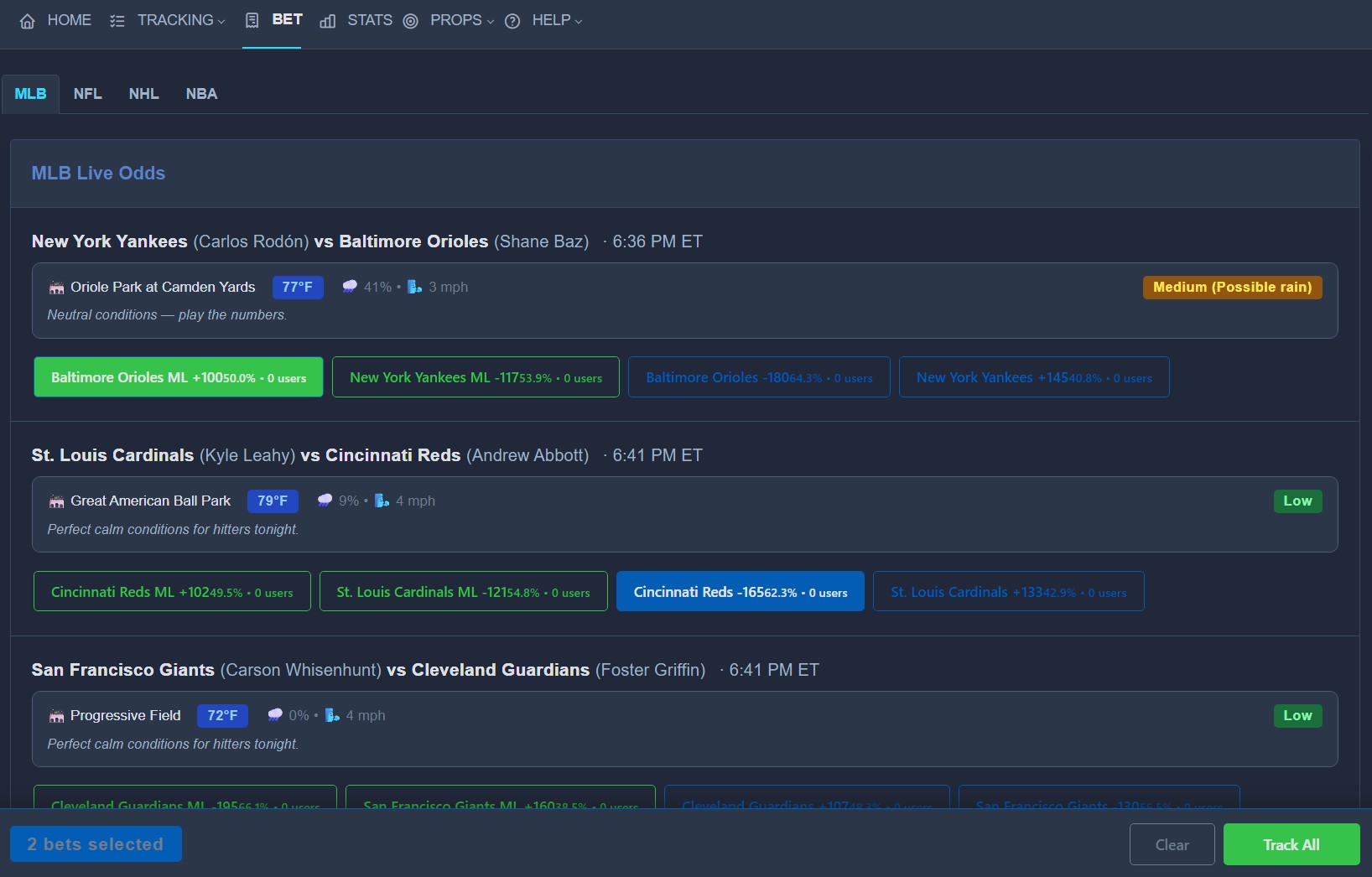
The Betting Page (/bet) is the web hub for logging picks from live odds. Picks appear on Tracking and in your stats right away.
Live slate
- Sport tabs (with logos): MLB, NFL, NHL, NBA, plus UFC / NCAAF / MLS / Liga MX when those slates are cached
- Cards or Table view (saved in your browser)
- Comfortable or Compact density (saved in your browser)
- ML and Spread buttons with win probability and how many users are on that side today
- Select one or more lines, then use the bottom bar to Track All or Add to Parlay
- MLB probable pitchers when cached
- Game times in Eastern time (helps with doubleheaders)
- Weather when available (full box in Comfortable; chip + popover in Compact)
Custom Manual Pick (web)
At the bottom of the page, use this form when the game is not on the live slate or you need an alternate line
(same idea as Discord /pick).
- Sport - NBA / NHL / MLB / NFL / UFC / NCAAF / MLS / Liga MX
- Team Name - one team (e.g.
Houston Texans) - Bet Type - Moneyline, Spread, Over, or Under
- Line (optional) - e.g.
38.5for a total, or-3.5for a spread - Odds - American odds (e.g.
-110)
For Over/Under, set Bet Type to Over or Under and put the total in Line. Manual picks that are not on the live odds board are stored with a special game id so they do not merge with unrelated matchups on Tracking.
/pick) only for alternates or missing games.
- Hover over any pick to see detailed odds movement
- See how many users are on each side of the bet
- Filter by sport - UFC, NCAAF, MLS, and Liga MX chips appear only when those games are cached
- Live score next to the LIVE badge when the score is already in cache
- Game start times (Eastern) when available - helpful for doubleheaders
- Injury indicator (hover for details) when injury data is present
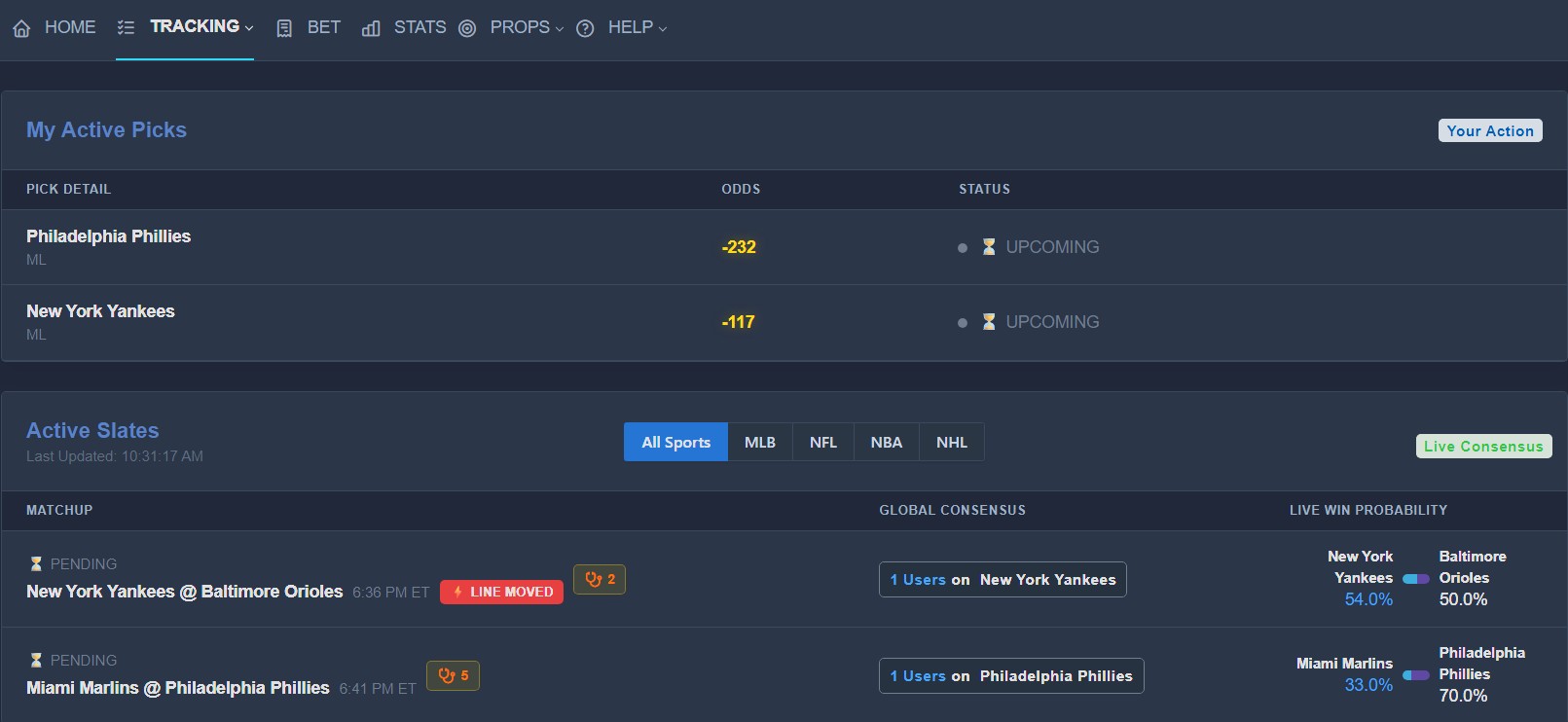
- Red LINE MOVED badge when steam is active - opens Steam Moves
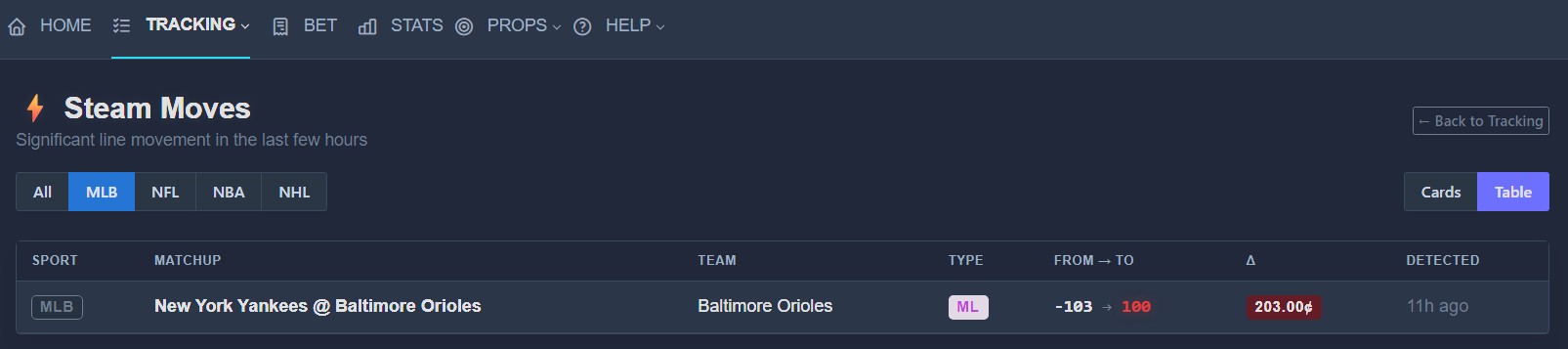
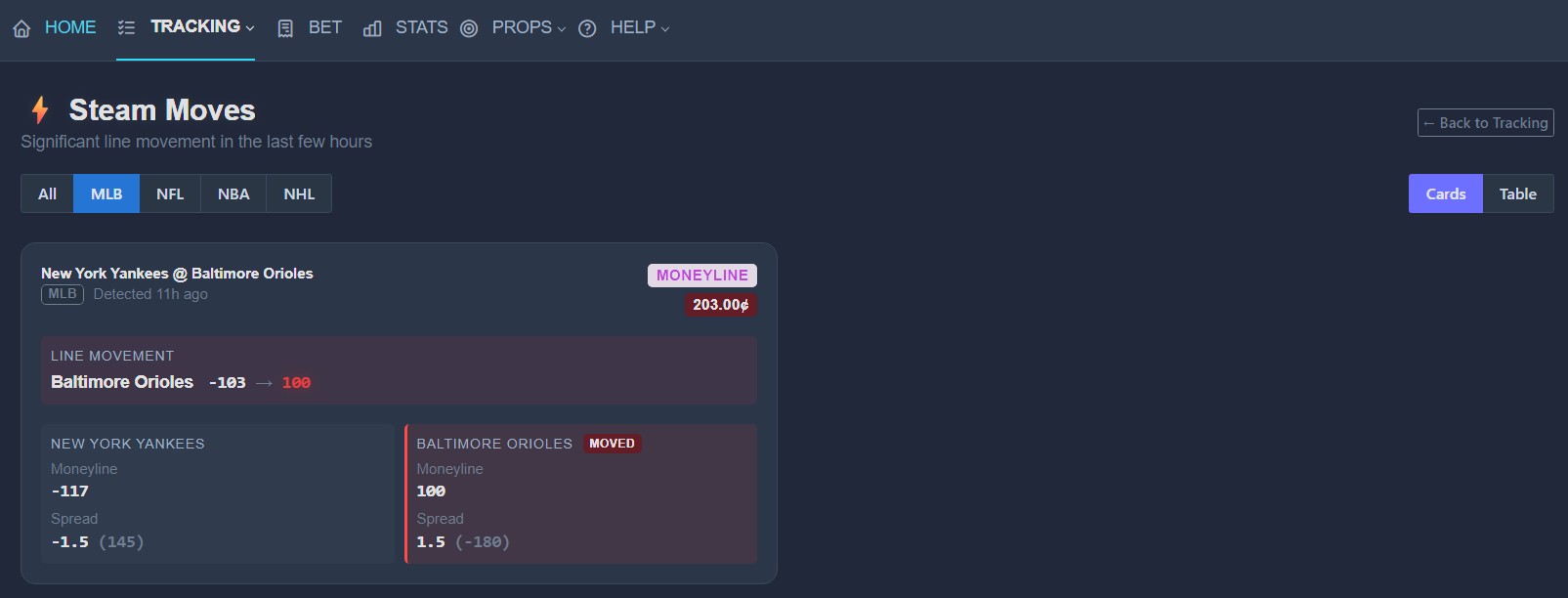
Steam Moves flag significant moneyline or spread changes between odds refreshes. Large moves can indicate sharp action. Betting Buddha stores recent moves and can alert Discord and show them on the web.
How it works
- Odds are refreshed on a schedule and compared to the previous snapshot.
- When a move crosses the threshold (spread points or moneyline cents), it is saved as an active steam move (about 3 hours).
- Alerts only post for games that still matter (not after the game is live), and only when server settings allow it.
Web portal - Steam Moves page
- Open TRACKING → Steam Moves (or go to
/steam-moves). - Filter by sport: All / MLB / NFL / NBA / NHL (plus extra sports when they are on the slate).
- Switch Cards or Table view.
- Each card/row shows the moved side, opposite side odds when available, delta, and time like “25m ago”.
Tracking page
When a game you are tracking has an active steam move, a red LINE MOVED badge appears next to the matchup. Click it to open the Steam Moves page for that sport.
Discord
/steam- list currently active steam moves (optionally by sport if available).- Automatic embeds: ⚡ STEAM MOVE in the channel configured for that sport (or the main announcement channel).
- Moves for the same game are grouped into one embed when possible.
Admin setup
- Run
/setupand enable Steam / Sharp alerts, or open Manage Server. - Master switch: Steam Move Alerts under General.
- Per sport: Steam Alerts tab - enable/disable each sport and set a channel ID (empty = main channel).
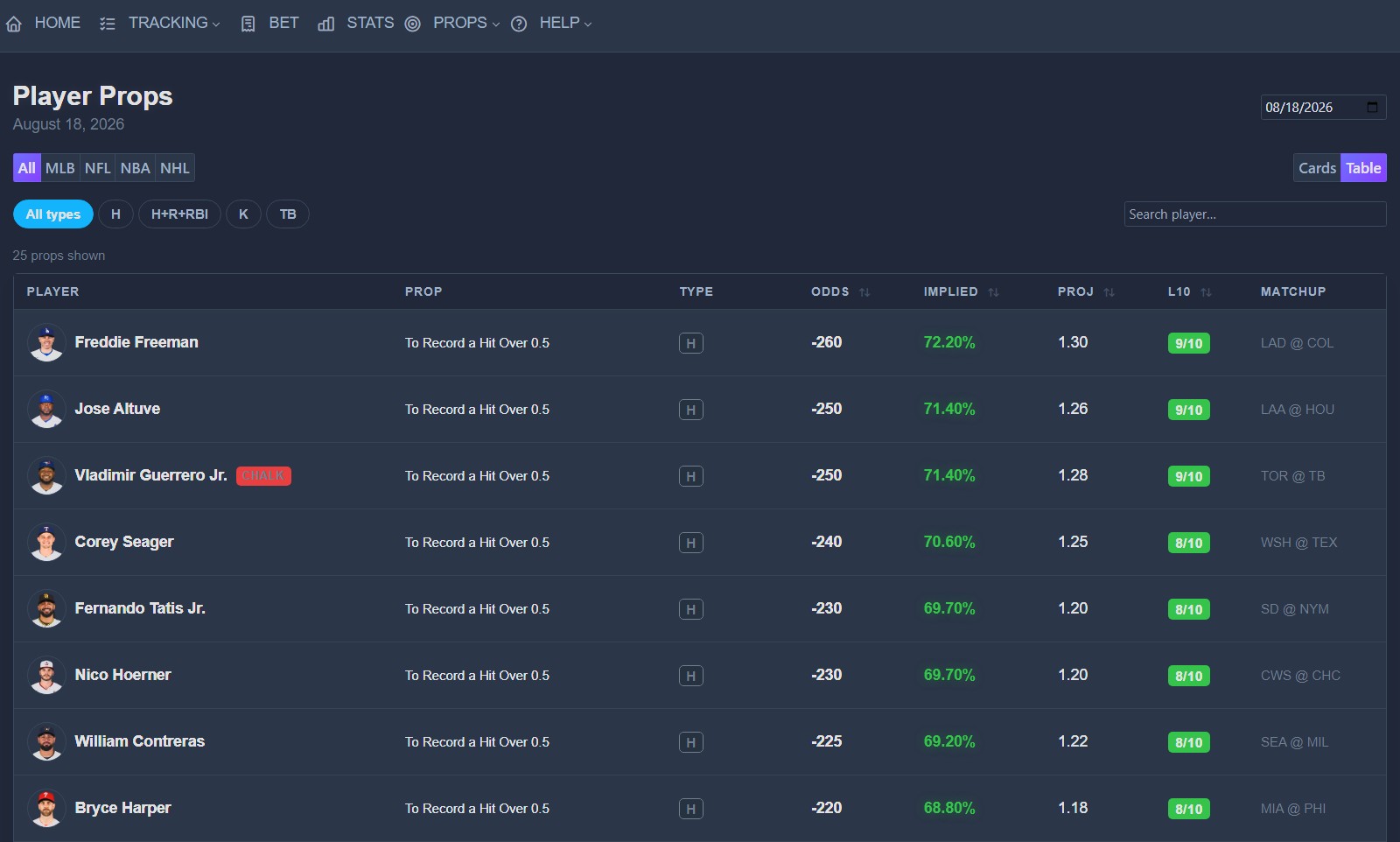
The Props page lists daily player props (hits, strikeouts, points, etc.) with odds, implied chance, projection, and recent hit rate (Last 10).
Web - how to use the board
- Open PROPS in the top nav (or pick a sport: MLB, NFL, NBA, NHL).
- Default view is a table (use Cards for larger avatars).
- Date picker - defaults to today; change it to review an earlier slate.
- Sport and type chips filter the list. Search filters by player name.
- Click Odds, Implied, Proj, or L10 to sort.
CHALK badges mark players on your server’s chalk list.
Track, endorse & untrack
- Track - adds that prop to PROPS → Live Props Tracking for your server.
- Click Track again (or Untrack on the tracking page) to remove it, only while it is still pending.
- Once a moderator marks Hit / Miss / Push, you cannot untrack it - it stays as history.
- Endorse (up arrow) is a vote, not a pick. It does not create a tracked row.
Logged-in users see display names on the server board. Guests on the public props page only see heat counts, not who is on a prop.
Moderators
Server admins set a Props moderator role on Manage → Branding. That role (plus server admins and the bot owner) can open PROPS → Moderate props and grade Hit / Miss / Push / Void.
Morning and evening recaps add a Player props line when the server had tracked props in that window.
Discord - /props
/props - top props for all sports today/props sport:MLB - that sport only
Discord shows a short top list plus a link to the full web page. The footer shows how many props this server has tracked today.
Discord - /prop-pick
/prop-pick player:Aaron Judge
Tracks that player’s slate prop the same way as the web Track button. Use the player name as it appears on the board.
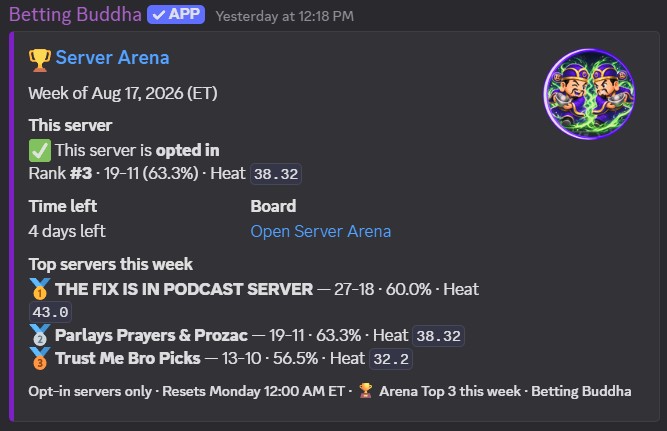
Server-vs-server monthly competition for communities that choose to compete.
Arena compares servers, not individual bettors. Only totals are public: wins, losses, pick volume, unique bettors, and a Heat score. Member names, personal records, and picks from servers that did not opt in are never shown.
How a month works
- The period is the calendar month (ET). Last month’s champions stay on the board.
- The Arena page shows days left in the current month.
- A server needs about 20 settled game picks this month to rank (wins + losses). Props and UFC also feed specialty Heat lanes.
- Pending / live picks do not count toward the board until they settle.
| Badge / column | What it means |
|---|---|
| Top Winning | Highest win % this month (then volume if tied). Badge: badge-topwinningserver. |
| Hottest | Most settled picks this month (then win % if tied). Badge: badge-hottestserver. |
| Heat | Standings sort. Mix of volume, win %, and unique bettors. |
Top Winning and Hottest can be two different servers once more than one guild is opted in.
6.3.1 How admins opt in
- Log in at botsbuddha.com and select your server.
- Open Manage → General → Daily Posts & Goals.
- Set Server Arena (opt-in) to Compete - appear on Arena board.
- Optional: enter a Public Arena name. Leave blank to use the Discord server name.
- Click Save All Settings.
The public name replaces the Discord name on the Arena page, badges, and
/arena embeds. Individual members are still never listed.
6.3.2 What users see on the web
Anyone logged in can open Server Arena from the nav (same area as Tracking). You do not have to be opted in to view it.
- Network pulse - anonymous last-24h pick counts across the whole bot (no server names).
- Top Winning / Hottest cards - opted-in servers that already cleared the 20-pick gate, with Discord icon + name.
- Standings table - rank, record, win %, picks, bettors, Heat.
- Dashboard - when at least one server is ranking, a small Arena snapshot and a link to the board can appear. It does not leak non-opted-in guilds.
Admins can jump to opt-in from the Arena page via Opt in on Manage (Manage itself is admin-only).
6.3.3 /arena command
/arena - this month’s Server Arena snapshot
The embed shows:
- Whether this server is opted in
- This server’s rank, record, and Heat (if it has 20+ settled picks)
- How many more settled picks are needed if you are opted in but not on the board yet
- Days left in the month
- Top 5 opted-in servers
- A link to the web board
Winning servers can receive Discord embeds for Top Winning Server, Hottest Server, Cage Heat (UFC), and Props Heat at month end. Members who contributed enough picks can see Arena ribbons on Stats (Champion Squad / Arena Contender). The dashboard shows your server’s monthly pick progress (example: 18/30).
A tournament is an optional named window on one Discord server. It reads the same game and UFC tickets you already track. It does not create a second bet slip, change settlement, or move Arena Heat. Cup wins still count on the server record.
Open the player board from Tracking > Tournament
or /tournament.
Each event also has a stable link: /tournament/{id}
(still requires Discord login on that server).
6.5.1 Admins
Any server admin with Betting Buddha installed can open an event from Manage > Tournaments. One live event per server. Closed events stay in history.
Event setup
- Event Name, Prize Text, From / To in Eastern Time (max 90 days).
- Rules Blurb (about 2 to 3 lines) pins under the banner on the player board.
- Banner Image URL is a wide HTTPS image, about 1400x400. Leave blank for the default header.
- Intro GIF URL is a small HTTPS gif or png (about 240x72 to 320x96) in the hero corner.
- Min Settled tickets before someone ranks on the official table (default 5).
- Scoring: record (wins, then fewest losses), win rate, or 1-unit proxy.
- Join Mode: auto-enroll tickets, or require Join (player page or the Join cup button on the standings embed).
- Sports in Official Table: MLB, NFL, NCAAF, NBA, NHL, Soccer, UFC. Official table ignores props and parlays.
- Max Players caps how many people can Join, not tickets per user. 0 means an open field.
- Max Picks / Day per user on the cup, counted in Eastern Time. 0 means no daily cap. Extra tickets that day still log on the daily board.
- Max Favorite / Max Underdog American odds allowed on the cup (example: -340 and +400). 0 means no cap. Tickets outside the band stay on the daily board.
- Which Tickets Count: only slips marked for the cup, or every ticket in the window. New events default to marked slips so extra daily games do not move the cup.
- Daily Post ET is hour 0 to 23, or -1 to skip. The bot checks about every 5 minutes in that hour and posts once per calendar day.
- Announce Channel on this tab. If blank, Recap or Picks from General is used.
- Announce Note prepended to open, mid, and final recap embeds.
Quick styles
Buttons at the top of the Tournaments tab fill the form only. They do not open the event. Review dates and caps, then press Open Tournament. Custom settings stay available.
- Weekend Cup: Friday through Monday, win rate, four cup tickets per day, Join required.
- Streak Challenge: seven days, longest win streak, three settled tickets to rank. A loss resets the run.
- One a Day: fourteen days, one cup ticket per Eastern day, ranked on record.
- Dog Hunt: seven days, favorites juicier than -110 stay off the cup.
Running the event
- Field List shows who joined. Sit Out removes them without asking them to find the player page.
- Why Tickets Stayed Off the Cup lists recent slips that did not count, with a reason (not joined, odds cap, daily cap, wrong sport, or not marked).
- Save Settings while live. Closed events cannot be edited.
- Post Standings sends the board plus Join cup / Sit out buttons.
- Test Post (DM me) sends a private copy so you can check the hour without spamming the server. Open a DM with the bot first.
- Duplicate Last Event copies name pattern, sports, caps, banner, and rules into a new live cup. Close the current event first.
- Re-snapshot rebuilds a frozen table once if you need a correction.
- Close and Freeze writes the official results. Rank 1 who met Min Settled can receive the Tournament Champion lifetime badge (not back-issued). Later grades do not rewrite the freeze unless you re-snapshot.
Tie-break after the scoring rule uses check-in streak. UFC and underdog side pots only appear when those cups actually have tickets. An empty UFC box means nobody logged a UFC cup slip.
6.5.2 Players
- If Join Mode requires a tap: press Join event on the player board, or Join cup on the standings embed in Discord.
- Keep using Bet, /bet, /pick, and UFC as usual.
- When Which Tickets Count is marked slips only, Discord sends Add to cup / Keep off cup after a successful /bet or /pick. The web Bet page has a tournament checkbox.
- Cup tickets show CUP on Tracking. After freeze, the winner can also see a CHAMP chip on those tickets.
- The player board shows a live ticker (field size, cup tickets, live games), your rank, record, streak, eligibility, gap, Top 10 with Discord avatars, and your cup tickets.
- Pending tickets never place you. Sit out if you do not want new tickets counted.
- Use the history dropdown to open a past event or
/tournament/{id}.
Parlays let a community track 2–4 legs as one ticket - not an advanced odds shop.
Use the Parlay Builder,
Add to Parlay on Bet or Props, or Discord /parlay.
6.4.1 Builder & Bet page
- Pick cached games (ML / spread) or add a player-prop / manual leg.
- Sport tabs follow the Bet page (logos; extra sports only on match days).
- On mobile, action buttons wrap so they stay on screen.
- Cancel the whole parlay only if no leg has started.
6.4.2 Live Parlay Tracker
Open PARLAYS → Live Tracker. Default view is today (ET) - same idea as Live Props Tracking. Use Prev Day for older tickets.
- My Parlays and Server Board each have a header icon.
- Each leg shows pending / live / hit / miss.
- Cached games auto-settle; UFC and props can be settled on Parlay Moderate (owner/mod role).
- Moderating a cached game as HIT/MISS applies across servers that share that same game id.
6.4.3 How a parlay scores
- All legs hit → the ticket is 1 win.
- Any leg misses → the ticket is 1 loss (not a loss per leg).
- That 1 win or 1 loss rolls into dashboard Totals, Top Sharp (this server only), streaks, win rate, monthly goal, stats 30-day momentum, and Discord
/leaderboard//statsstyle commands.
The Chalk List is your server’s “Banned Player” tracker. Use it when a player performs poorly, tanks a parlay, or simply doesn’t show up when it matters.
How to Use the /chalk_list Command
- Adding a Player
Action: Select Add Player to List
Sport: Choose NBA, MLB, NHL, NFL, UFC, NCAAF, MLS, or Liga MX
Team Name & Player Name: Enter details
Reason: Briefly explain why (e.g., “Went 0-8 from 3PT range”) - Viewing the List
Action: Select View Chalk List
The list is ephemeral (private) - only you see it when you trigger the command.
• No duplicates allowed
• Auto-cleanup after 14 days (UFC: ~2 months)
• Premium servers get custom branding on the list
8.1 How Sharps Are Calculated
A Sharp is a bettor who consistently beats the market over the long term.
We use a proprietary Sharp Score based on professional metrics:
| RANK | METRIC | WHY IT MATTERS | WEIGHT |
|---|---|---|---|
| 1 | Closing Line Value (CLV) | Beating the final market odds | Highest |
| 2 | Long-term ROI | Actual profit over many bets | Very High |
| 3 | Win Rate + Volume | Minimum ~80 tracked picks required | High |
| 4 | Consistency & Recent Form | Recent 30-day performance | Medium |
8.2 How to Follow Sharps
Go to the dashboard Sharps tab (or Stats Hub Server Leaders) and click Follow on a Sharp card. Alerts go to the web bell by default.
Open Account → Notifications & Followers to choose:
- Settled picks to web bell and/or Discord DM
- Sharp follows to web bell and/or Discord DM
- Follow Recap → Discord DM - one digest around 8:10pm ET of picks from people you follow (not a DM per pick)
- Mute all Sharp alerts without unfollowing
Toggles save for the server selected in the top nav. Unfollow lives on that same Account list. Discord DMs only send if your privacy settings allow messages from the bot.
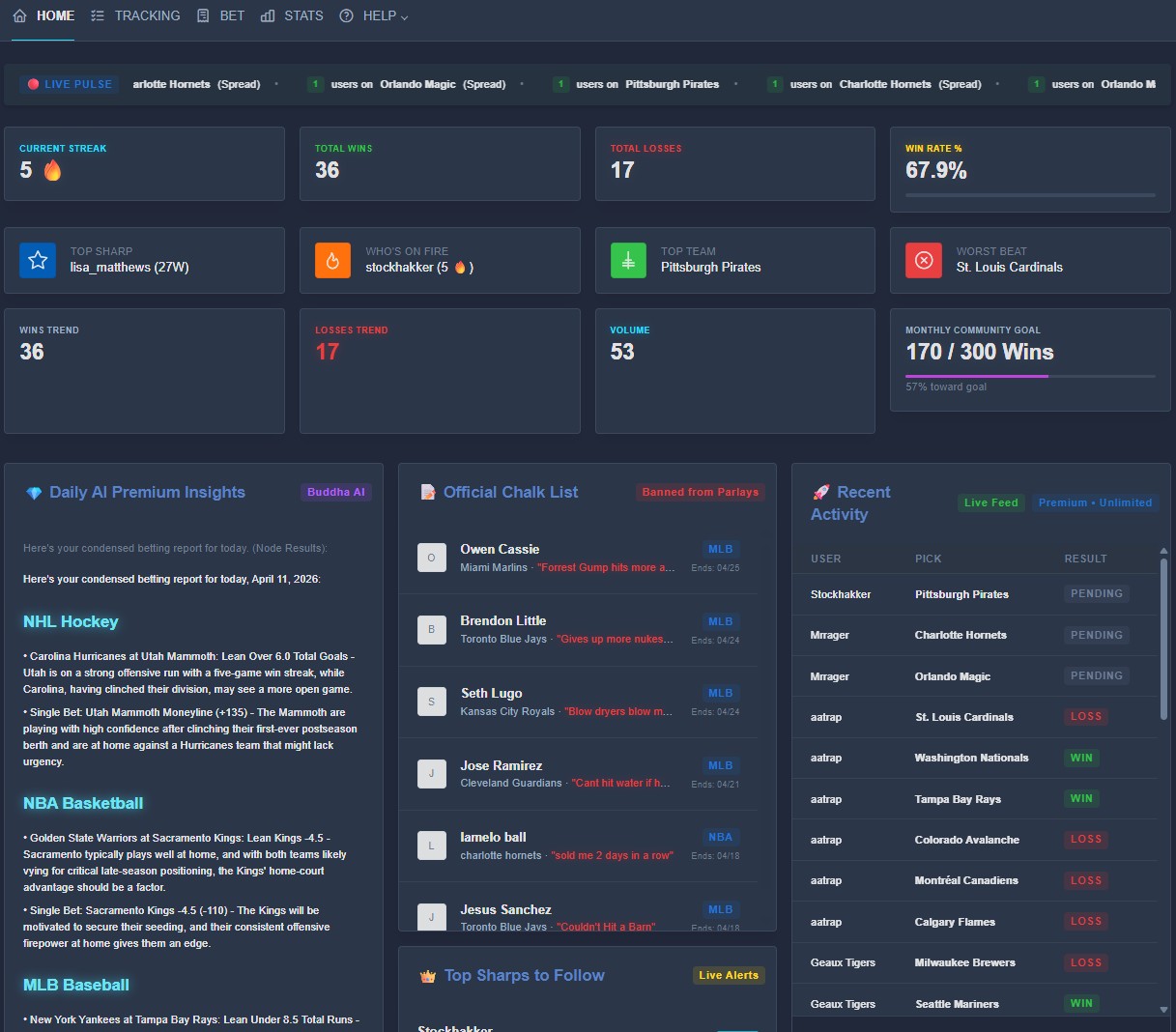
The web dashboard at botsbuddha.com gives you a clean, real-time view of all your activity and community insights.
- Top Sharp counts wins for the selected server only (not every guild you share with the bot).
- Game wins, prop wins, and parlay tickets are shown separately where those boxes exist.
- Arena progress (picks this month) and latest lifetime badge can appear when data exists.
- Pick of the Day appears at the top of the dashboard when staff publish one.
- Daily AI Visions highlight MLB, NFL, NBA, NHL, UFC, MLS, Liga MX, and NCAAF when those names are in the copy.
9.1 Stats Hub
Open STATS → Stats Hub for a full record view of this server: You vs Server, Server Leaders (display names), Sharp list with Follow, pick history with sortable columns (type and status), and a performance strip (Best / Worst Sport and Best / Worst Bet Type, minimum sample of settled games).
9.2 Props Lab
Under PROPS → Props Lab, search a player (last name is enough) to see Hit / Miss / Push, Over vs Under, prop types, who in this server tailed them, and Showcase / Closest Misses. Server Prop Leaderboard uses Discord avatars. Showcase rows use the sports-player avatar when one is stored on the prop.
9.3 Account Alerts & Profile
Click your avatar in the nav → Account. Public tagline and short bio are free
and show on Stats. No URLs, invites, or @handles. Banner color uses a color picker.
Default stake (units) lives here when Units are enabled. Player's Card (/week-card) can include your display name, tagline, and referral link. On your own Stats or Player's Card page, Copy Discord Bio puts a live 7-day record line on the clipboard for Discord About Me. The week-card PNG link updates with the week. It is optional.
9.4 Team Stats
Under STATS → Team Stats (also /team-stats). This page is server-scoped game research, the team version of Props Lab. Select your server in the top nav first.
Search a club with a partial name (Yanks, KC, Philly).
Matching names appear as chips. The card uses only picks (and related props)
from the active guild. No extra Odds API calls.
On a team card you get:
- Record - wins, losses, pending, win % on this server
- Active Bets Today - open tickets on that team
- Home / Away - from
Away @ Homematchups when stored - ML vs Spread vs Total - settled splits with a bar
- Who Tails vs Fades - tails bet the team; fades bet the other side of that matchup
- Top Bettors - volume on that team and how often it won when they bet it
- Last 10 Tickets - bettor, type, matchup, result
- Props - open and recent player props whose matchup mentions the team
- Pick of the Day - only if that team was on a POTD slate; shows slate W-L
With no search, three boards stay visible: Hottest Teams (30 days, 5+ settled tickets), Most Bet Teams, and On The Board Today.
Buddha Base Score
A 0-99 mark that exists only on Betting Buddha. It is not a sportsbook number and is not shared across servers. It answers: "Does this server have a real read on this team?"
- Sample - more settled tickets raise the floor (capped)
- Edge - win rate vs 50% (about a coin flip / -110 world)
- Breadth - distinct bettors, not one whale
- Recency - settled tickets in the last 14 days
- Consensus - several tails plus a winning side, or a fade that was right
Labels from the score:
- Fade Zone - the board has not been paid to back them
- Developing - thin or mixed sample
- Playable - enough tickets to respect, not enough to crown
- Sharp Lean - this server has an edge on the name
- Buddha Lock - thick sample, winning side, more than one voice
A card that shows 0 plus Developing with no tickets loaded is the empty placeholder, not a scored team. After a real search with history, the score cannot sit at 0.
- Advanced personal stats (CLV, ROI, heatmaps)
- Stats workbook view and download (online book + Excel/CSV)
- Enable Units (default stake on new picks)
- Follow Sharps + instant notifications (Follow can be premium-gated later)
- Unlimited Recent Activity feed
- Buddha AI Profile Insights and Daily AI Picks
- Monthly Community Goal customization (Premium Servers)
- Custom embed color and chalk-list branding
- Custom Steam Radar thresholds (Moneyline cents / Spread points) when that gate is on
- Pick of the Day card (when staff publish one and the gate is on)
- Manage Performance tab for server admins
UFC, soccer, NCAAF, parlays, and badge auto-posts are free now.
10.1 Server Premium Trial
On Manage, next to the server name you will see Free, Premium Server, or Trial Premium Server - X Days Left. Admins on a never-trialed free server can start a one-time 14 day Server Premium trial. After it expires the server returns to Free and the request button does not come back. A News banner can remind you one day before expiry with a Store link.
10.2 Units & Stats Workbook
Premium users/servers can open the online stats book and download a workbook from Stats. Enable Units sets a default stake (0.1 to 20) on new picks from the web Bet queue and Discord when supported. Units on a pick are locked after it is submitted. Change your default on Account for future bets only.
10.3 Pick of the Day
Discord uses the server's Pick of the Day channel if set on Manage, otherwise the AI Picks / recap / announcement channel.
| Metric | How it is calculated |
|---|---|
| Win Rate | (Wins / (Wins + Losses)) x 100. Pushes and voids do not count. |
| Current Streak | Consecutive wins or losses on settled game picks in that server. |
| Parlay ticket | 1 win if every leg hits. 1 loss if any leg loses. Legs are not extra W/L on the game board. |
| Clutch label | Shown next to a record when clutch outcomes exist. It is a tie-breaker on /leaderboard, not the primary rank. |
11.1 Leaderboards
Discord /leaderboard and the dashboard Daily / Weekly / Monthly / All-Time boards
rank by wins first, not by win percentage.
- Most wins
- Then fewer losses
- Then more clutch wins
Win % is displayed only (example: 12W-4L | 75.0%).
A 20-10 record (67%) ranks above a 12-1 record (92%) because 20 wins beat 12 wins.
What counts
- Win / Hit on outcome or status = win
- Loss / Miss = loss
- Push / Void / Pending do not add a W or L
- This server only (the guild you ran the command in, or the server selected in the nav)
Windows (America/New_York)
- Daily - midnight ET today
- Weekly - Monday 00:00 ET
- Monthly - 1st of the month 00:00 ET
- All-Time - no date filter
Boards that do use win rate (with a minimum sample) include Top Sharp sport badges
and some Arena heat sorts. Those are separate from /leaderboard.
Clutch Power Ratings (Points)
Clutch points measure risk taken on a settled pick. They appear as extra context, not as the main leaderboard sort.
- Favorites & Evens (-101 or lower): 1.0 Point - the safe play.
- Slight Underdogs (+100 to +149): 1.5 Points - the value play.
- Major Underdogs (+150 or higher): 2.0 Points - the elite play.
Tip: Hit an underdog, get a clutch boost. The rank order on /leaderboard is still wins, then losses, then clutch.
Buddha's Insight is a Premium-only AI-powered section on the Stats page that highlights high-confidence betting intelligence in real time.
Primary Edge Right Now
Shows the strongest +EV (positive expected value) bet available right now.
Requirements to populate:
- Pending bets placed in the last 12 hours.
- Bets from qualified sharps only: minimum 25 settled bets and ≥55% win rate.
- At least 2 different qualified sharps betting the exact same side (team + bet type + line).
- Positive edge (odds - closing line > 0).
If no bet meets all criteria, it displays "No strong edge right now".
Power Hour
Highlights the best-performing 1-hour window of the day based on actual win rate.
Requirements to populate:
- Settled bets (with win/loss outcome) placed today.
- The hour with the highest win percentage is selected.
If there are no settled bets today, it shows "No clear window".
Hot Sharp Picks Today
Displays consensus picks where multiple qualified sharps are aligned.
Requirements to populate:
- Pending bets placed in the last 24 hours.
- Bets from qualified sharps: minimum 20 settled bets and ≥52% win rate.
- At least 2 different qualified sharps on the exact same side.
Shows up to 4 picks, ordered by number of sharps then edge. If none qualify, it shows "No strong consensus yet".
Open Stats → Lifetime Achievements to see badges you have earned in the selected server. Hover a badge to enlarge it. Awards run overnight (and can be forced by the bot owner). If the server has Lifetime Achievement posts enabled on Manage, Discord gets an embed with the badge art and why it was earned.

Rookie Bettor
Place 50 bets.
Dedicated Grinder
Place 250 bets.

Veteran Bettor
Place 500 bets.

Betting Legend
Place 1,000 bets. Grants the server 3 months of Premium.

Ironman
Place 2,000+ bets. Grants the server 6 months of Premium.

First Winner
Cash your first settled win.

Consistent Winner
52%+ win rate on 100+ settled bets.

True Sharp
55%+ win rate on 200+ settled bets.

+EV Master
Lifetime positive Closing Line Value.

ROI King
Lifetime ROI of +8% or better.

Underdog Slayer
60%+ win rate on +150 or longer odds (min 30 bets).

Parlay Master
Win 5+ multi-team parlays.

Prop Specialist
Place and settle 30+ player props.

Arena Contender
Member of a Top-10 Heat server for a month (min 5 settled picks).

Champion Squad
Member of a monthly Arena category winner (min 5 settled picks).

MLB Grinder
Highest MLB win rate in the server (qualified sample).

NBA Sharpshooter
Highest NBA win rate in the server (qualified sample).

NHL Edge Hunter
Highest NHL win rate in the server (qualified sample).

NFL Beast
Highest NFL win rate (min 20 NFL bets).

Octagon Rookie
Settle your first 10 UFC fights.

Cage Contender
Settle 25 UFC fights.

Finisher
55%+ UFC win rate across 20+ fights.

UFC Sharp
58%+ UFC win rate across 40+ fights.

Soccer Rookie
Settle your first 10 soccer picks (MLS + Liga MX).

Pitch Contender
Settle 25 soccer picks.
Pitch Sharp
55%+ soccer win rate across 20+ settled picks.

Week Warrior
Track a pick 7 days in a row.

Iron Calendar
Track a pick 30 days in a row.

Hot Streak
Hit a 10+ win streak.

Unbreakable
20-game streak without a loss.

Recruiter
Refer 5+ active users who each placed 10+ bets.

Sharp Mentor
Have 10+ users following you.
What can I ask if I tag @Betting Buddha?
Sayhelp after the mention. Keywords include hot/streak, sharp, stats, badges, who is on, leaderboard, live, yesterday, arena, steam, chalk, props, parlay, ufc/soccer/ncaaf, potd, units, and portal. See section 3.1.Why don't my picks show up on the web?
Make sure you are logged into the same Discord account and have selected the correct server in the top nav.How do I follow a Sharp?
Dashboard or Stats Hub Server Leaders - click Follow. Manage alerts on Account → Notifications.Why is last night's parlay still on the tracker?
The Live Parlay Tracker is today (ET). Use Prev Day for older tickets. date_key should match the ET slate day.Can I use /bet or /pick outside the main channel?
Yes - commands work in any channel the bot can see. /setup still picks the channel used for auto posts and alerts.Do sport tabs always show on Bet / Tracking?
No. MLB, NFL, NBA, NHL, UFC, NCAAF, MLS, and Liga MX tabs and filters appear only when that slate is cached for the day.How do I log an alt spread or F5 / 1H?
Use /pick. bet: +2.5 (alt spread), F5 or f5 -0.5 (MLB first 5), 1H or 1h -3.5 (first half).How is /leaderboard ranked?
By wins first, then fewer losses, then clutch. Win % is display only. This server only. Daily / Weekly / Monthly windows use Eastern Time.Why didn't I get a Follow Recap DM?
The toggle is per server in the top nav. The digest runs about 8:10pm ET and only if a followed Sharp has picks that day and Discord allows DMs from the bot.Can I change units after I submit a pick?
No. Change your default stake on Account for the next pick.Can we trial Premium more than once?
No. The 14 day Server Premium trial is one time per server.What is Team Stats and the Buddha Base Score?
STATS → Team Stats (or /team-stats). Search a team this server has bet. Record, splits, tails/fades, last tickets, and POTD only if that club was a Pick of the Day. Buddha Base Score is 0-99 from this server's sample, win rate vs 50%, number of bettors, last 14 days, and tail/fade consensus. It is not a sportsbook rating.Open Manage from the web portal for a server you admin (or use the “Open Server Management Page” link after install). Only server admins and the bot owner can access this page. Changes apply after you click the purple Save button on that tab.
How to get there
- Log in at botsbuddha.com with Discord.
- Select the correct server in the top nav.
- Open Manage for that server.
https://botsbuddha.com/manage/YOURSERVERIDHERE
The page opens on Performance (server admin stats: volume, win rate, top cappers, bets today, props, parlays). Other tabs: News, General, Steam Alerts, Streamer, Tools, and Audit.
The header shows Free / Premium Server / Trial days left. Request Premium Trial is a one-time 14 day grant.
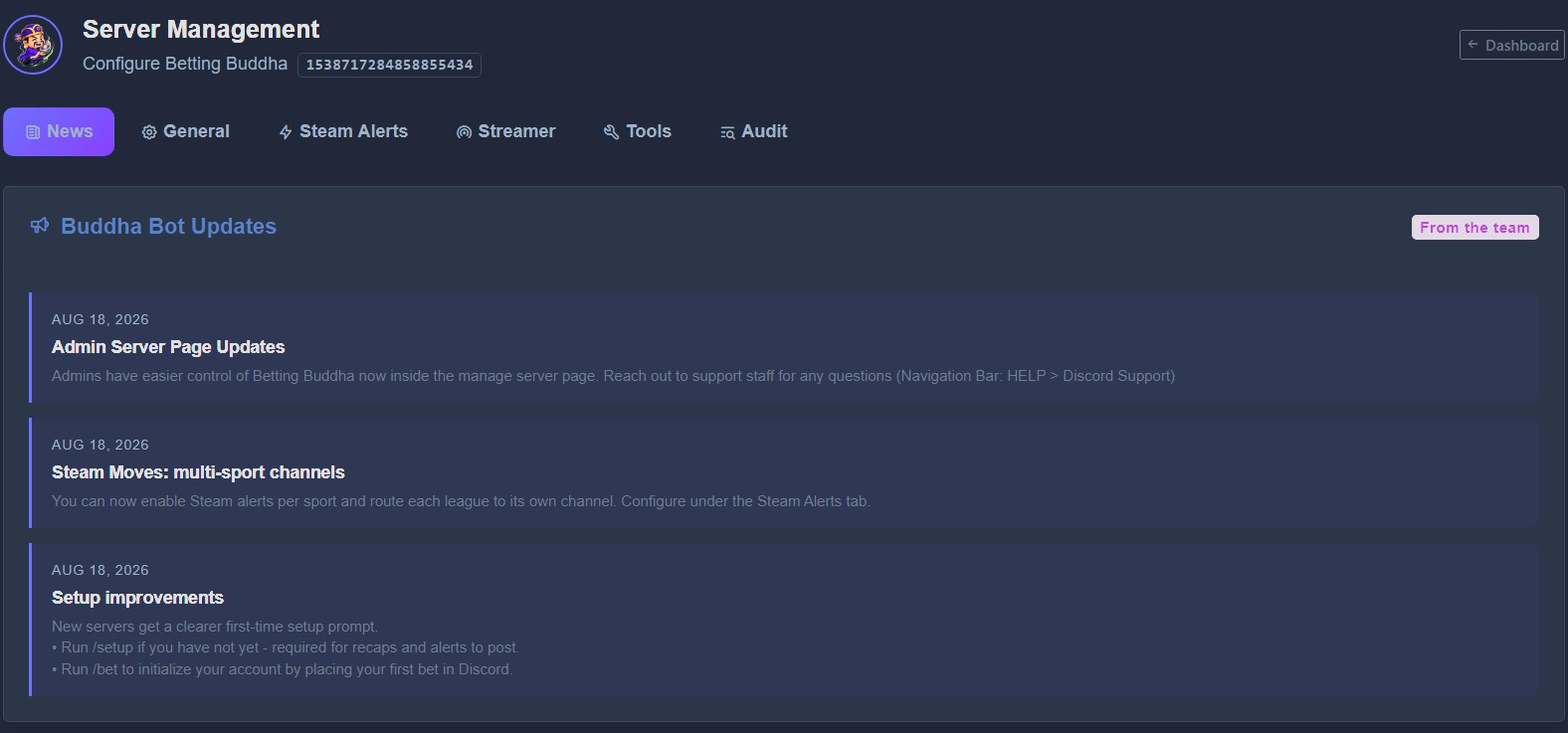
News
Read-only updates from Betting Buddha staff (new features, fixes, reminders). You do not save anything here.
General
This is the main setup tab. Click Save All Settings after changes.
Channels
- Announcement Channel ID - main channel for picks, steam (if no per-sport channel), and most bot posts. Required for the bot to post.
- Recap Channel ID - morning (8 AM ET) and evening (8 PM ET) recaps. If empty, recaps use the announcement channel.
- AI Picks Channel ID - daily Buddha AI Visions. If empty, AI posts use recap, then announcement.
- Pick of the Day Channel ID - optional. Staff POTD Discord posts use this first, then AI / recap / announcement.
- Server Arena (opt-in) - appear on the public monthly board. Optional public name. Totals only; never individual members. See 6.3 Server Arena.
In Discord: right-click the channel → Copy Channel ID (Developer Mode must be on: User Settings → Advanced → Developer Mode).
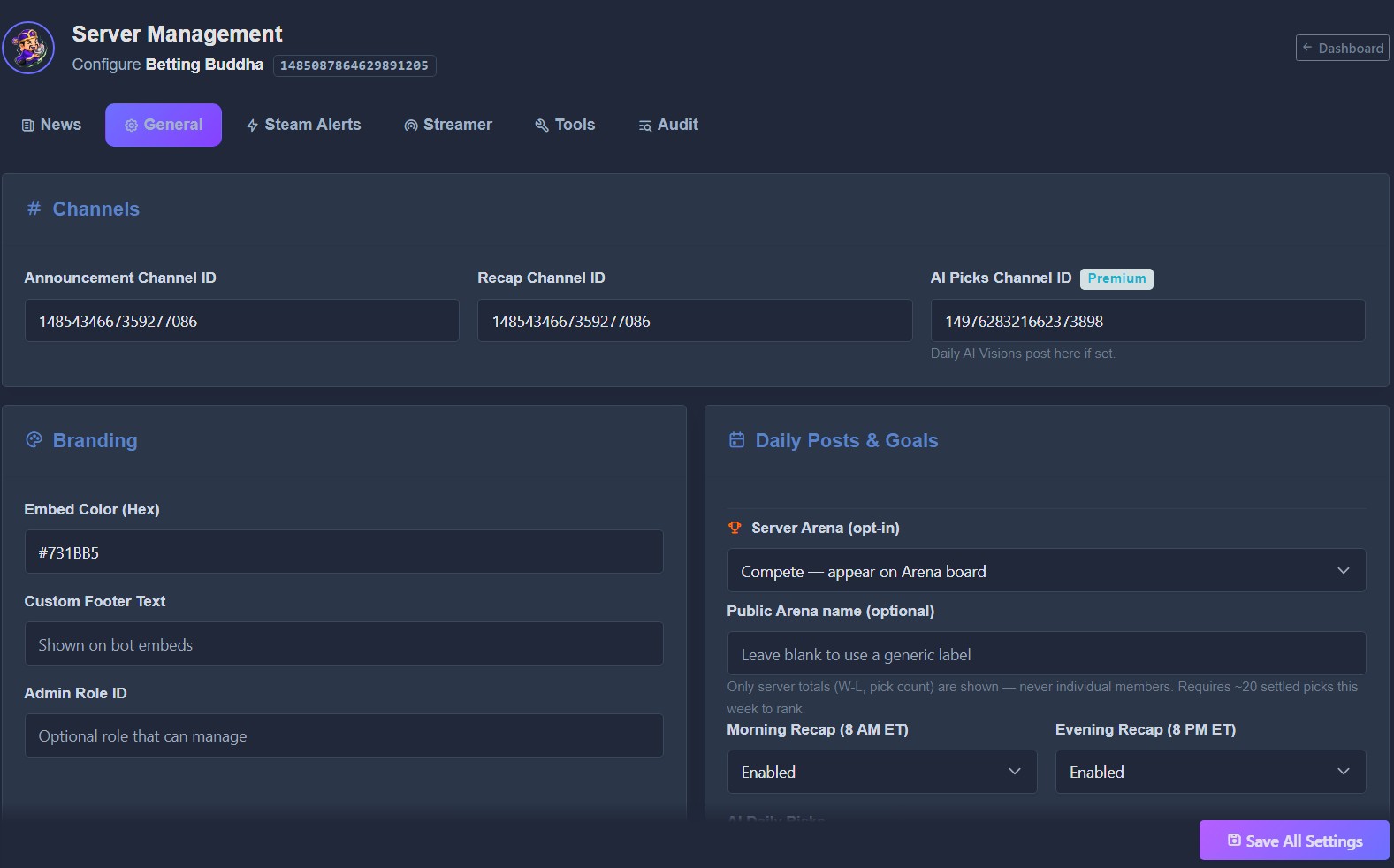
Branding
- Embed Color - hex color for bot embeds (e.g.
#AB1AA9). Premium servers can set a custom color. - Custom Footer Text - optional line at the bottom of embeds.
- Admin Role ID - Discord role allowed to manage the bot (in addition to people with Manage Server).
Daily Posts & Goals
- Morning Recap (8 AM ET) / Evening Recap (8 PM ET) - enable or disable those auto-posts.
- AI Daily Picks - enable the morning AI slate in the AI / recap / announcement channel.
- Steam Move Alerts (master) - global on/off for steam posts. Per-sport channels are on the Steam Alerts tab.
- Monthly Community Win Goal - target win count shown in recaps (Premium).
/setup, fill in at least
Announcement Channel ID here and save. That is the same required first-time setup.
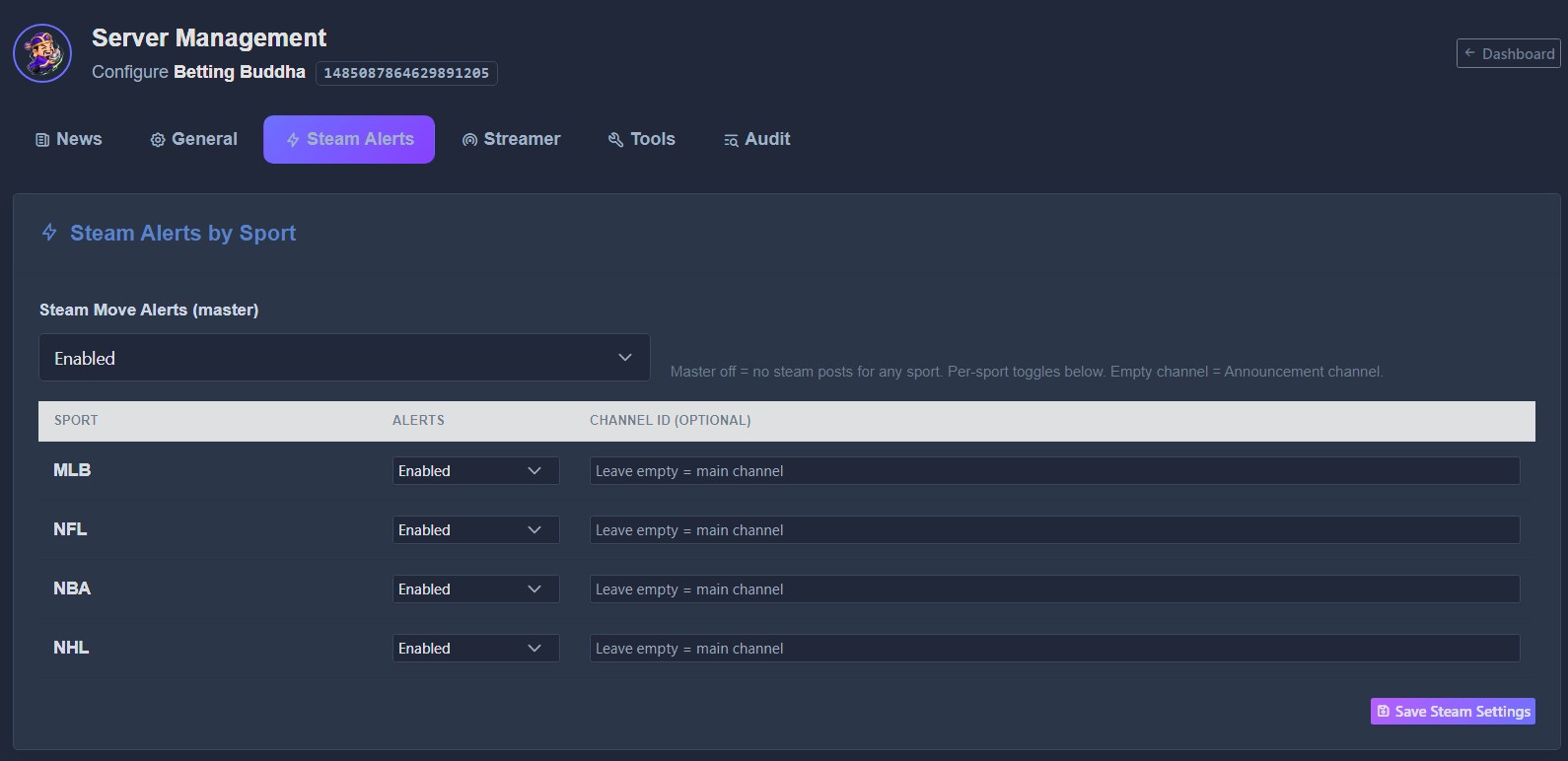
Steam Alerts
Control steam / line-move posts by sport. The master switch is at the top of this tab. Per-sport toggles sit below it. Click Save Steam Settings after changes.
- Alerts - Enabled or Disabled per sport (MLB, NFL, NBA, NHL, plus extras when used).
- Channel ID (optional) - sport-specific channel. Leave empty to use the Announcement channel.
- Moneyline Threshold (cents) and Spread Threshold (points) - custom Steam Radar values. Free servers keep default steam alerts. Custom fields grey out when the Premium gate for custom thresholds is on.
Example: MLB steam in a baseball channel, NFL steam in a football channel. Discord alerts only go out for games with pending/live picks (and not after the game is already LIVE). Anyone can still view moves on the web under TRACKING → Steam Moves.
Streamer (BETA)
Optional Kick username for live-stream notifications. Save on that tab if your page has a separate save for streamer settings.
Audit (use this first)
Search recent picks for this server. You need the Pick ID before you can void, force win/loss, or delete a pick on the Tools tab.
- Open the Audit tab.
- Search by user name or Discord ID, Pick ID (if you already have it), and/or date (
YYYY-MM-DD). - Click Search.
- Copy the Pick ID # from the results.

Tools
Admin-only actions. These are permanent - confirm the Pick ID in Audit first. Recent Picks on this tab loads a larger scroll (about 100) so you can find today's IDs without Audit for quick cases.
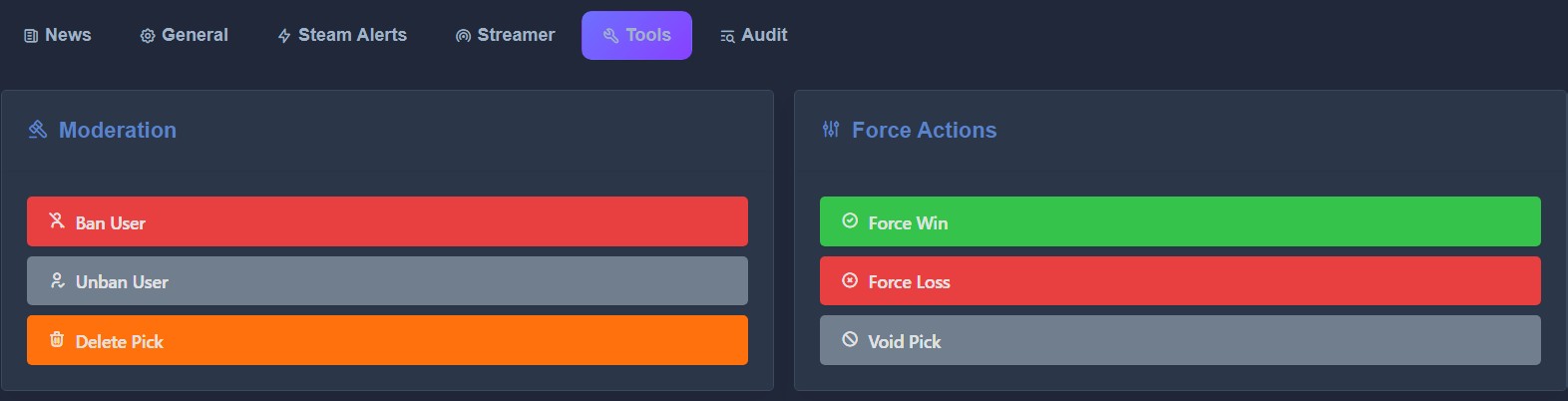
Moderation
- Ban User - block a user from placing picks in this server.
- Unban User - restore pick access.
- Delete Pick - remove a pick by Pick ID (use Audit to find the ID).
Force Actions (settlement overrides)
- Force Win - mark that Pick ID as a win.
- Force Loss - mark that Pick ID as a loss.
- Void Pick - cancel/void that Pick ID (does not count as win or loss).
Typical use: API missed a result, postponed game, or a bad line that should not count. Enter the Pick ID from Audit when the modal asks for it.